Ajax pet immunity helps compatible motion detectors filter movement from dogs and cats, but it does not make every animal invisible to the system. A pet may still trigger an alarm when it climbs furniture, uses stairs, moves close to the detector, or enters a more sensitive part of the detection area.
Correct performance depends on the exact detector, its placement and settings, the room layout, and the pet’s real behavior while the system is armed.
What Is Ajax Pet Immunity?
Ajax pet immunity is a motion-detection feature designed to reduce alarms caused by normal animal movement.
An indoor infrared detector does not identify a dog or cat the way a video analytics system might. It reacts to changes in infrared radiation created by moving objects whose temperature differs from the surrounding environment.
Depending on the detector model, its optics, sensor configuration, and software evaluate characteristics of the infrared signal and movement pattern to determine whether an alarm should be generated.
Pet immunity is therefore not based on weight alone. The same animal can create a different detection pattern depending on:
- Its height inside the room
- Its distance from the detector
- Whether it is walking, running, or jumping
- Whether it is on the floor or furniture
- The detector installation height and angle
- The selected sensitivity
- The shape and layout of the protected space
In a professionally configured Ajax security system, motion detectors can work with door and window sensors, glass-break detection, sirens, app alerts, photo verification, backup communication, and available monitoring options.
Why Can a Pet Still Trigger an Ajax Motion Detector?
A pet can trigger a motion detector even when it falls within the published pet-immunity limits because the detector does not measure the animal’s actual weight.
For example, a dog walking calmly across the floor creates a different infrared pattern from the same dog standing on its hind legs or jumping onto a sofa.
A pet-related alarm becomes more likely when the animal:
- Climbs onto a sofa, chair, counter, or cabinet
- Uses a tall cat tree or window ledge
- Walks near the detector
- Climbs a staircase
- Runs or jumps through the room
- Moves together with another pet
- Enters an area the installer expected to remain clear
Ajax specifically warns that furniture or other surfaces a pet can climb should not obstruct or change the intended detector view. The company also notes that a detector may respond when an animal reaches the detector’s level or moves close to it.
A professionally designed residential security system should account for where pets actually sleep, play, climb, and move not only their stated weight.
How Do Furniture, Cat Trees, and Stairs Affect Pet Immunity?
Elevated surfaces change the pet’s position inside the detection area.
A cat may walk across the floor without causing an alarm but trigger the same detector after jumping onto a shelf or cat tree. A small dog may remain below the more sensitive detection area until it stands on a sofa.
Stairs create a similar problem. The animal starts near floor level and gradually moves higher through the detector’s view.
Rooms that require additional attention include those with:
- Sofas directly below a detector
- Tall cat trees
- Open shelving
- Cabinets used by cats
- Window benches
- Staircases and raised landings
- Loft areas
- Furniture beside stairs
The solution is not always to lower sensitivity. A better detector angle, another installation location, or greater reliance on door and window protection may provide stronger coverage with fewer pet-related alarms.
What Do the Published Pet-Immunity Limits Mean?
Pet-immunity specifications must be checked for the exact detector being installed.
For MotionProtect Jeweller, Ajax documents pet immunity for animals weighing up to 44 pounds and measuring up to about 20 inches tall when the detector is installed and configured correctly. The same documentation recommends installation approximately 7 feet 10 inches above the floor with a clear field of view.
Ajax also documents the following sensitivity guidance for MotionProtect Jeweller and MotionCam Jeweller support materials:
- High sensitivity: intended to ignore cats up to about 10 inches tall
- Medium sensitivity: intended to ignore small dogs up to about 14 inches tall
- Low sensitivity: intended to ignore animals up to about 20 inches tall
These are model-specific recommendations not universal limits for every Ajax motion detector.
The lowest sensitivity is not automatically the best choice. A sensitivity change should always be followed by a detection-zone test to confirm that the detector still identifies human movement along likely intrusion routes.
Why Do Installation Height and Direction Matter?
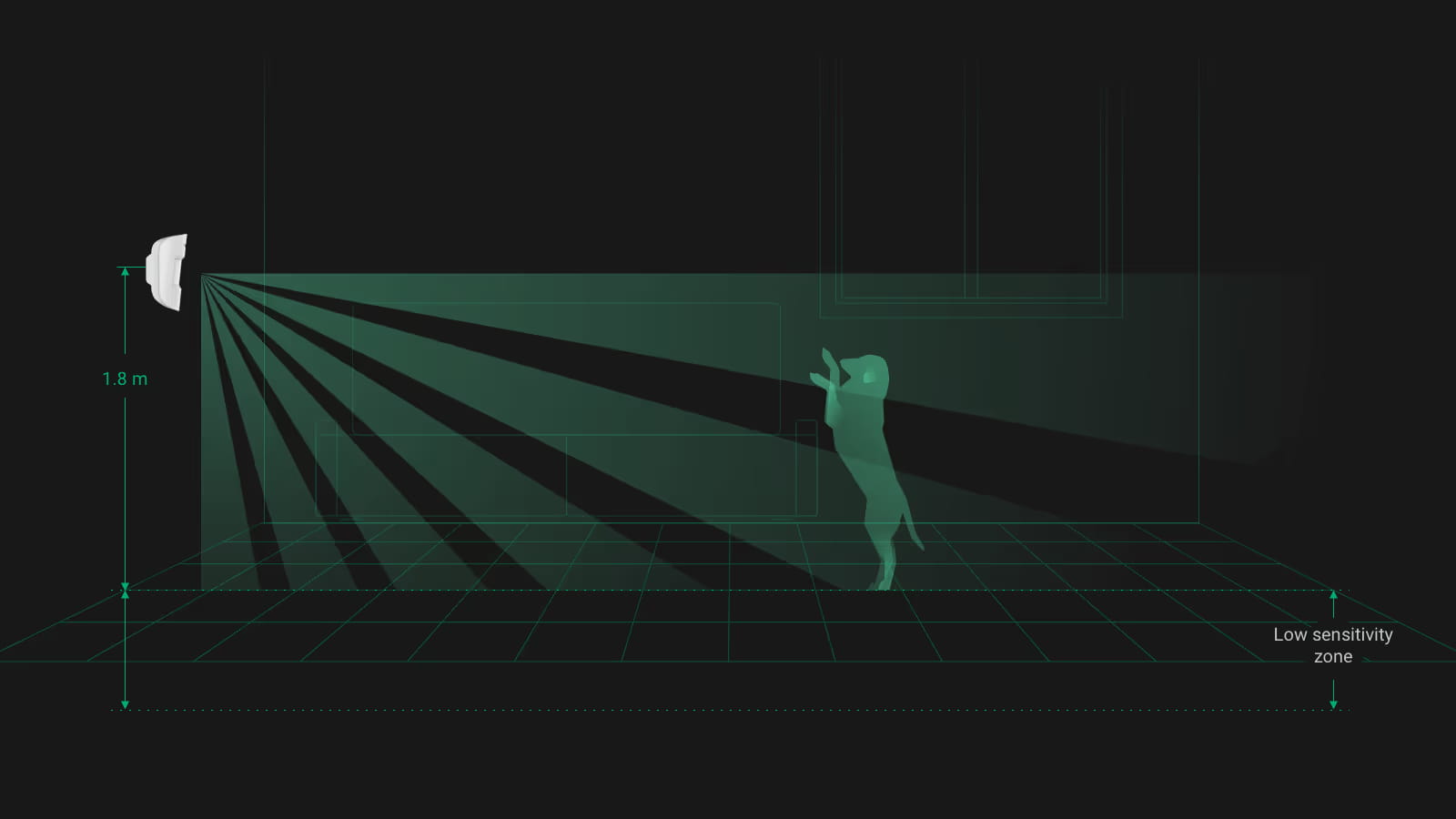
Installation height affects how the detector’s coverage is distributed across the room.
When an indoor detector is mounted below the recommended height, animals may move through a more sensitive part of the detection area. A device aimed toward stairs, furniture, or a cat tree may also see a pet at a greater apparent height than expected.
Professional security system installation should consider:
- Likely intrusion paths
- Normal pet routes
- Detector height and angle
- Furniture and elevated surfaces
- Stairs and landings
- Windows and direct sunlight
- HVAC vents, fans, and heat sources
- Signal strength
- Sensitivity settings
- Detection-zone test results
A detector should be positioned according to how the room actually functions, not simply placed in the most convenient empty corner.
How Do Common Ajax Detector Families Differ?
The following table is a practical overview rather than a complete Ajax product catalog. Current specifications should always be confirmed for the exact model and regional version.
MotionProtect Plus uses an additional K-band microwave scan after infrared motion is detected. This can help filter interference associated with airflow, heated curtains, fans, fireplaces, and air-conditioning equipment, but it does not replace correct placement or testing.
Why Might Pet-Related Alarms Happen Only at Night?
Nighttime alarms often indicate that the pet’s routine or the room environment changes after dark.
A cat may use counters or shelves only when the house is quiet. A dog may climb stairs during a storm, investigate outdoor noises, or move into rooms it does not normally use during the day.
Environmental conditions may also change because of:
- Heating or air-conditioning cycles
- Moving curtains near an air vent
- Fans
- Fireplaces or space heaters
- Rapid temperature changes
- Pets reacting to wildlife outside
The event time, detector location, room conditions, and available alarm photos should be reviewed before changing the system configuration.
Pet movement is also only one potential source of unnecessary alerts. Read our guide to other causes of home security false alarms and how photo verification helps for a broader look at batteries, open doors, user routines, camera zones, and installation issues.
How Should a Pet-Related Alarm Be Diagnosed?
A useful diagnosis begins with the exact alarm event not with an immediate sensitivity change.
When a compatible MotionCam detector provides photo verification, the alarm images may help show whether the event involved a pet, a person, or another source of movement. Ajax describes MotionCam as a motion detector that supports visual alarm verification and records events in the Ajax app.
A professional review should confirm:
- The exact detector model
- Installation height and direction
- Furniture and elevated pet routes
- Current sensitivity
- Signal strength
- Detection-zone test results
- Event history and available alarm photos
How Should Ajax Pet Immunity Be Tested?
Pet immunity should be tested under realistic conditions after installation and after meaningful changes to the room.
A practical test should include:
- Arm the protected area.
- Allow the pet to follow its normal routes.
- Include sofas, stairs, beds, shelves, and cat trees the pet regularly uses.
- Conduct a separate walk test with a person moving through likely intrusion paths.
- Review event history and available alarm photos.
- Confirm that required human detection remains reliable.
Testing should be repeated when furniture is rearranged, a cat tree is added, the pet’s routine changes, or the detector is repositioned.
Key Takeaways
- Pet weight alone does not determine whether an alarm will occur.
- Furniture, cat trees, and stairs can move a pet into a more sensitive detection area.
- Installation height, direction, and sensitivity must be checked together.
- Pet-immunity limits vary by detector model and configuration.
- Realistic pet testing and human walk testing are both required.
Get Professional Help With Pet-Related Motion Alarms
If your dog or cat continues to trigger motion alarms, replacing the detector may not be the first solution.
The system may need a different detector position, viewing angle, sensitivity setting, or combination of motion and entry sensors.
Request a professional security assessment from ASPEX Secure. As an Ajax Systems Authorized Partner, we design, install, configure, support, and monitor professional security systems for Houston homes based on the property layout, pet behavior, entry points, daily routines, photo-verification needs, and available monitoring options.